
ADD PASSWORDS THROUGH CLIENT APPLICATION
The "Add Passwords Through Client Application" allows GateKeeper users to add passwords to their profiles. These can be domain, local, web, or application passwords. We recommend keeping this option enabled for your users. The setting is enabled by default and is set per Group under Advanced Settings.
Recommended Setting: On
How to disable the ability to add passwords through the GateKeeper Client app.
1. Log into your GateKeeper Hub instance.
2. Click "Groups & Settings".

3. Click "Global Settings".

4. Scroll down until you see "ALLOW USERS TO ADD PASSWORDS".
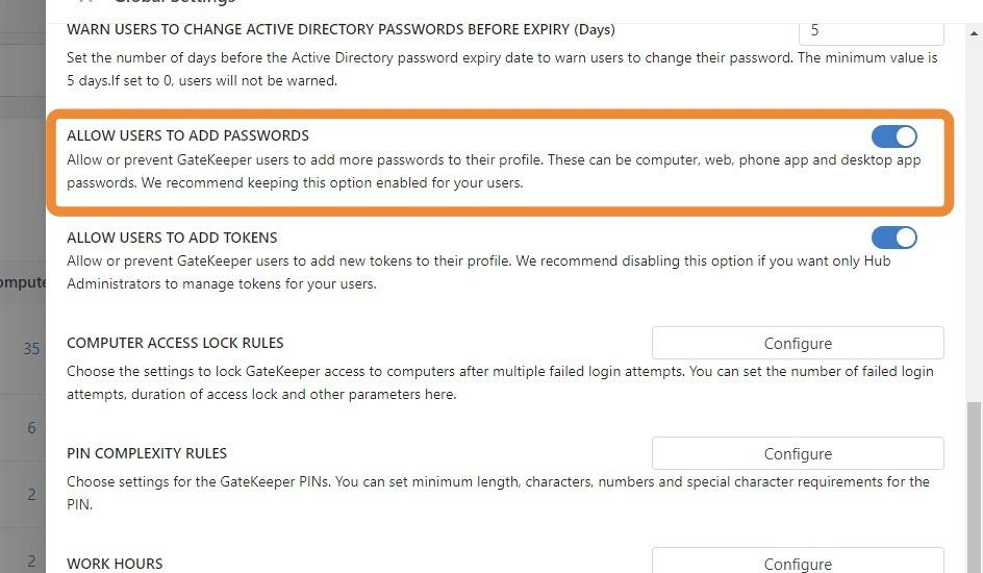
5. Toggle the switch to the left to disable users from adding passwords.

6. Click "Save Changes". Done.

For any additional questions or concerns regarding faster 2FA, proximity settings, computer locking, password management, or compliance, please contact GateKeeper Enterprise support using the Support Ticket form on https://gkaccess.com/support/ or email support@gkaccess.com.
Comments
0 comments
Please sign in to leave a comment.