
Mitigating man-in-the-middle attacks using GateKeeper.
Utilizing two-factor authentication prevents malicious actors from successfully executing a man-in-the-middle attack, even if a password is stolen. The thief would still need the second authentication factor to gain access to the targeted account.
A read-only device firmware prevents cryptographic key readback if an attacker gains physical access to the token. The tokens only accept over-the-air firmware update when the firmware is signed by Untethered Labs, Inc. – making it impossible to insert malicious firmware into a token.
In order to prevent duplication of GateKeeper tokens and mitigate Man-in-the-Middle (MiTM) attacks, a randomly generated SECRET KEY can be written to each token post registration. This SECRET KEY is then used to automatically generate one-time passcodes on the token which are sent as part of the Bluetooth advertisement packets and scanned by the client software. These one-time passcodes change every few seconds and therefore, prevent other Bluetooth devices from imitating a GateKeeper token.
How to Mitigate MitM using GateKeeper tokens. |
|
| Set up and use a VPN to login. | Users can seamlessly login to their VPN using a key rather than tediously and repeatedly typing passwords by hand. |
| Log out of websites more often. | Signing back in is seamless using a key, meaning users can log out of websites without fear of having to sign back in. |
| Prevent phishing attacks. | Most phishing attacks rely on unsuspecting users to give up their login credentials. If the user uses a key, they don't know the password to give up. GateKeeper only auto-fills on approved websites, so users can avoid phishing sites simply by letting GateKeeper auto-fill. |
| Use 2FA to enhance security. | Using GateKeeper, 2FA is done automatically and users login faster than ever with fewer steps. |
| Use longer and harder-to-guess passwords for your router, computer, websites, and programs. | Using a longer and more difficult-to-guess password is not what people naturally tend to do because it's more effort to memorize and type. GateKeeper allows 50+ character passwords that can take supercomputers centuries to guess. |
| Reducing password resets. | GateKeeper allows admins to use longer and more secure passwords in place of more frequent password resets. |
| Eliminating passwords written on paper. | Sometimes, an insecure password written on paper for everyone to see can lead to a malicious actor finding the credentials. Avoid this by using a password manager and making passwords too long and complex to write down. |
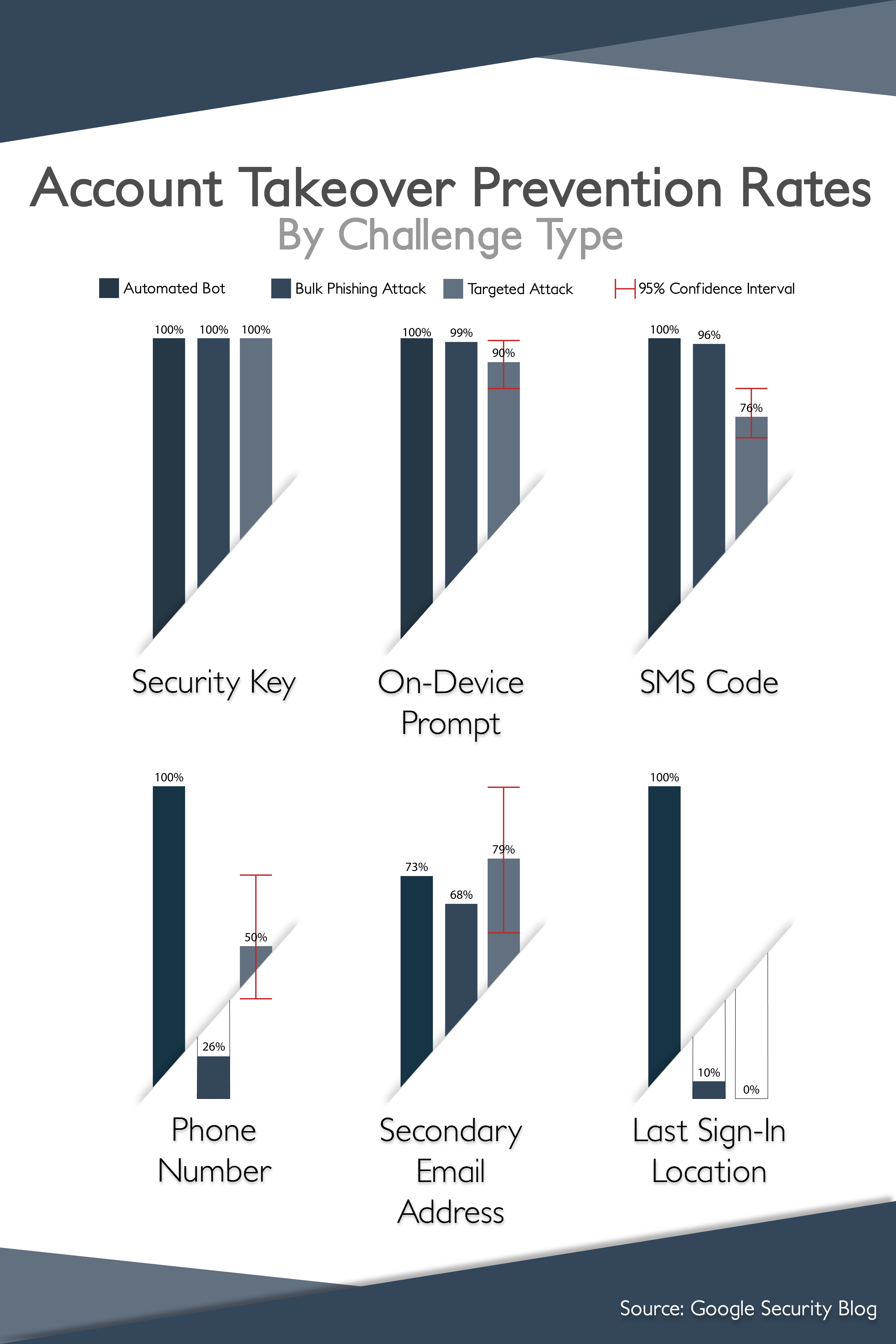
| Avoiding SMS text 2FA. | Research has proven that SMS 2FA is vulnerable to MitM attacks. Using a localized hardware token is significantly more secure. A study by Google research determined that no users that exclusively used security keys for 2FA fell victim to targeted phishing during the investigation. |
|
Don't share passwords. |
Using GateKeeper, users can securely "share" passwords with other users without the risk of interception through a secure password manager. |
For any additional questions or concerns regarding proximity settings, computer locking, credential management, or compliance, please contact GateKeeper Enterprise support using the Support Ticket form on https://gkaccess.com/support/ or email support@gkaccess.com.
------------------------------------
GateKeeper defends MiTM; mitm attack prevention; man-in-the-middle attack preventing; prevent mitm attacks; preventing cyber attacks;
Comments
0 comments
Please sign in to leave a comment.