
The on-premise GateKeeper Hub is a server application with an SQL database connection for admins to manage users, computers, and auditing information. If you want to delete the Hub database, please follow the steps below.
If you do not have Microsoft SQL Server Management Studio installed, please click here to download the software.
Deleting the GateKeeper Hub database
1. Begin by logging into the Source server. Open Microsoft SQL Server Management Studio by selecting Start > Microsoft SQL Server > Microsoft SQL Server Management Studio.
2. Log into the SQL Server using Windows Authentication or SQL Authentication.
3. Expand the server, expand Databases, select the GateKeeper database you want to move.
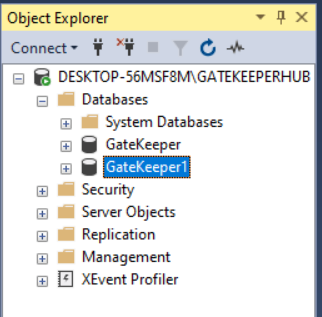
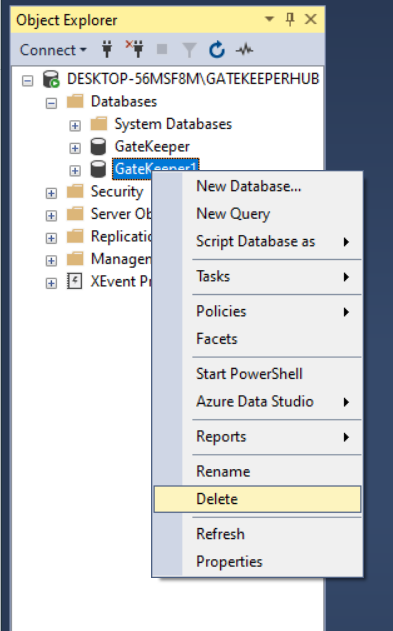
4. Right-click on the GateKeeper database and select Delete.
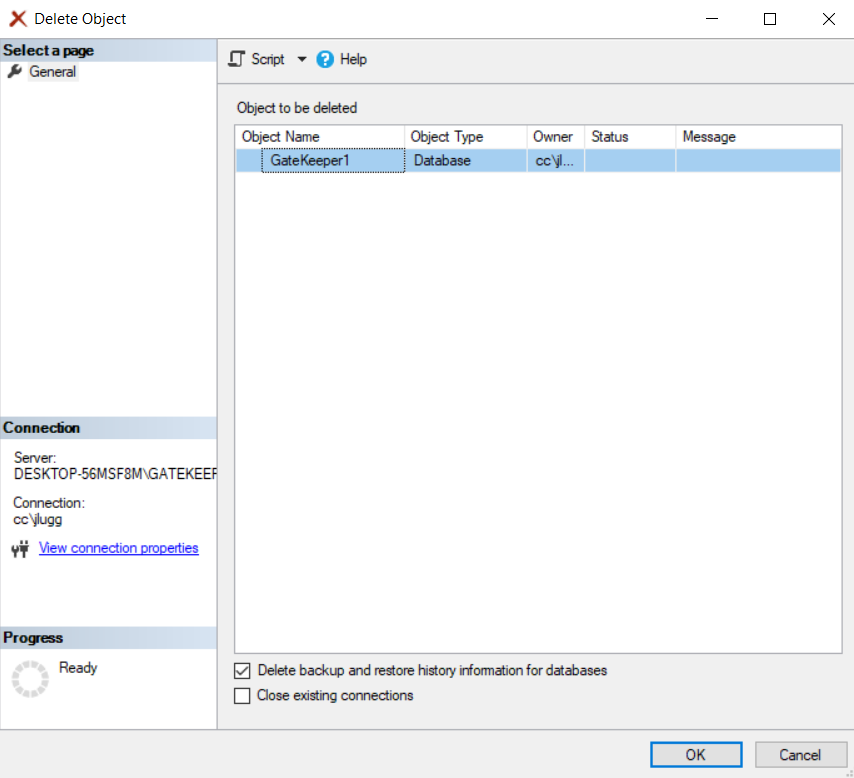
5. In the Delete Object window, check the box Delete backup and restore history information databases, then click OK. Done!
For any additional questions or concerns regarding proximity settings, computer locking, credential management, or compliance, please contact GateKeeper Enterprise support using the Support Ticket form on https://gkaccess.com/support/ or email support@gkaccess.com.

------------------------------------------
uninstall hub; how do i remove the GateKeeper Hub; remove the Hub software; uninstall the GateKeeper Hub; delete the database; 2 databases;
Comments
0 comments
Please sign in to leave a comment.